FANUC 0-M / 0-T CRT to LCD Conversion & Upgrade Guide
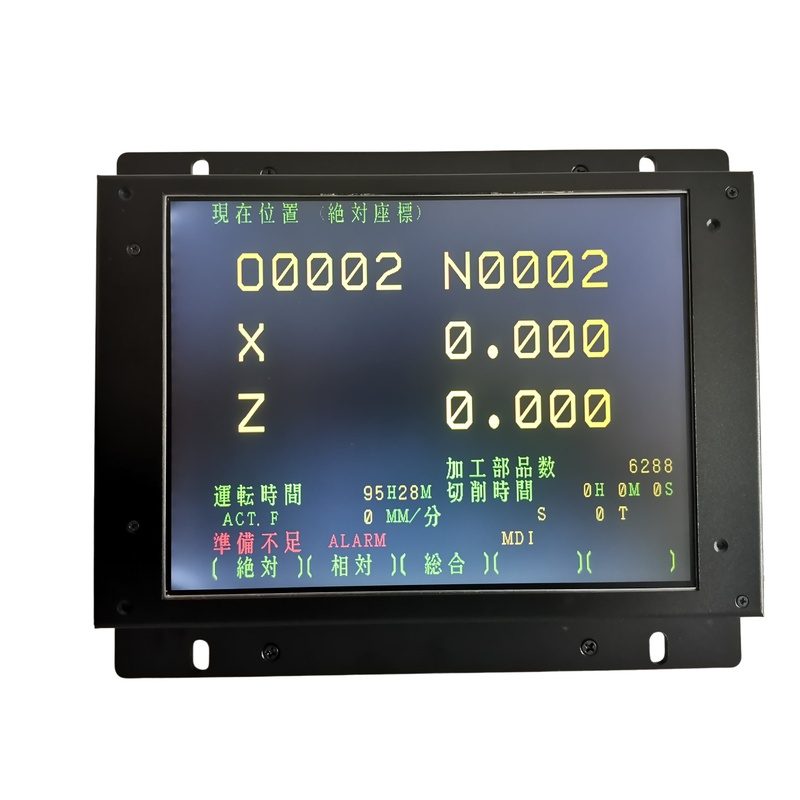
The FANUC Series 0 control shipped in three display-bearing variants: 0-M for machining centers and mills, 0-T for lathes and turning centers, and 0-Mate as the entry-level model. All three drive a 9-inch monochrome CRT over a 20-pin Honda MR-20M connector, and all three are now well past the design life of that CRT.
This guide covers what fails on a 0-M / 0-T display, how to confirm which CRT you have, the full technical comparison against the Kongto LCD module, and the five-step installation. Every specification below is taken from the corresponding product page — nothing is estimated.
Which FANUC 0 Series Control Do You Have?
The display module is the same for all three variants, but the control family tells you what to expect from the rest of the machine. Identify it from the control name plate on the cabinet door, or from the software screen at power-up.
| Control | Machine Type | Display | Connector | Display Power | LCD Upgrade |
|---|---|---|---|---|---|
| FANUC 0-M | Machining center, mill | 9" Monochrome CRT | 20-pin Honda MR-20M | DC 24V | $255 |
| FANUC 0-Mate | Entry-level machining center | 9" Monochrome CRT | 20-pin Honda MR-20M | DC 24V | $255 |
| FANUC 0-T | Lathe, turning center | 9" Monochrome CRT | 20-pin Honda MR-20M | DC 24V | $255 |
If your CRT carries a FANUC part number label rather than a 0-M / 0-T control label, the A61L-0001-00xx series is the display identification instead. Read that label before ordering — the 9-inch monochrome A61L units and the 14-inch colour units take different modules. See the FANUC A61L series CRT to LCD guide for the part-number breakdown.
9-inch CRT vs 9-inch LCD — Technical Comparison
The table below is the specification pair published on the FANUC 0-M / 0-T LCD upgrade product page. The original column is the CRT fitted by FANUC; the Kongto column is the module that replaces it.
| Specification | Original FANUC CRT | Kongto LCD Upgrade |
|---|---|---|
| Display Technology | 9-inch Monochrome CRT | 9-inch TFT-LCD Industrial Panel |
| Resolution | 640x400 / 640x480 | 800x600 |
| Brightness | ~200 cd/m2 | 350-450 cd/m2 |
| Lifespan | ~15,000 hrs | 50,000+ hrs |
| Power | DC 24V | DC 24V (original) |
| Interface | 20-pin Honda MR-20M | 20-pin Honda (direct compatible) |
| Safety | High voltage (10-15kV) | Low voltage DC |
| Weight | — | 1.5 kg |
Two rows matter more than the rest. Screen size stays at 9 inches, so the original bezel, mounting frame and viewing window all carry over — this is not one of the retrofits that drops a 9-inch CRT down to an 8-inch panel and leaves a gap. And the DC 24V input is unchanged, so the module draws from the machine's existing display supply rather than needing a separate adapter.
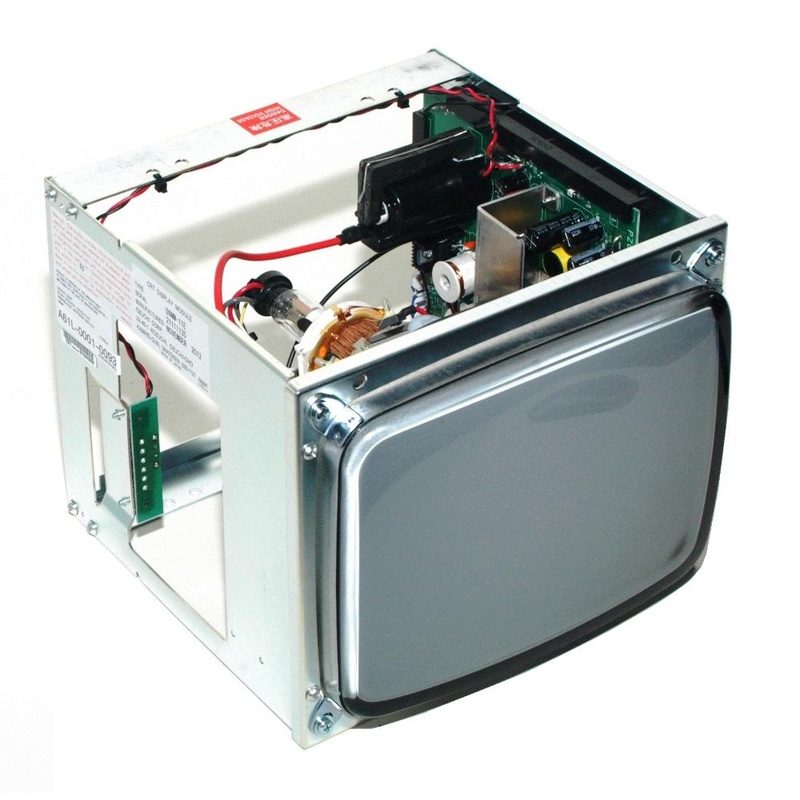
CRT Failure Symptoms on FANUC 0-M / 0-T Controls
| Symptom | Likely Cause | Repairable? | Solution |
|---|---|---|---|
| Dim, washed-out picture | Cathode and phosphor wear | No | LCD upgrade |
| Black screen, power LED on | Flyback transformer or high-voltage section failure | Sometimes | LCD upgrade (removes HV section) |
| Flicker or vertical rolling | Sync circuit drift, dried capacitors | Sometimes | LCD upgrade |
| Picture shrinks then fades | Deflection circuit or yoke failure | No | LCD upgrade |
| Intermittent display when warm | Cold solder joints on the display board | Sometimes | LCD upgrade (permanent) |
| High-pitched whine from the display | Flyback oscillation, aging insulation | No | LCD upgrade (safety) |
Only two of these are worth repairing. A flyback or capacitor fault can be fixed at board level, but on a 0-M / 0-T display the repair bill is usually a large fraction of a replacement module, and the second failure tends to arrive within a year or two. Everything caused by tube wear — dimness, shrinking picture, soft focus — cannot be repaired at all, because the CRT itself is the worn part and replacements are no longer produced.
FANUC 0-M / 0-T LCD Upgrade Products
9" Mono CRT to 9" TFT $255 A61L-0001-0093
9" Mono CRT to TFT $155 FANUC TX-1424AB
14" Colour CRT to 12.1" TFT $299
Installation Steps
1. Power Down
Switch off the CNC main breaker and disconnect the machine from mains. Wait one minute for the display's high-voltage capacitors to discharge.
2. Photograph the Connector
Before removing anything, photograph the CRT label and the cable entry point. This confirms the 20-pin Honda MR-20M connector and gives you a reference for reassembly.
3. Remove the CRT
Undo the mounting screws and slide the CRT housing forward. Unplug the 20-pin Honda connector and the DC 24V supply wires. No soldering is involved at any point.
4. Fit the LCD Module
Set the LCD into the original mounting frame. The hole pattern matches the FANUC CRT footprint, so the original screws are reused and the 9-inch viewing window lines up.
5. Reconnect and Power On
Plug in the 20-pin Honda connector and DC 24V. Restore power and start the control. The picture appears without parameter changes; adjust brightness with the module's controls.
Typical installation time is 10 to 15 minutes. No CNC parameter changes are required — the machine's programs, offsets and settings stay exactly as they were, because the module presents the same video signal to the control as the original CRT did.
Frequently Asked Questions
A: Check the control name plate on the cabinet, or the CRT part number label on the display housing itself. All three variants use the same 9-inch monochrome CRT and the same 20-pin Honda MR-20M connector, so the same LCD module fits all of them.
A: No. This module uses a 9-inch TFT-LCD panel, matching the original 9-inch CRT's visible area. Some retrofits for other models drop to an 8-inch panel; this one does not.
A: No. It runs on the machine's existing DC 24V display supply, the same rail the original CRT used.
A: Yes. Resolution increases from 640x400 / 640x480 to 800x600, and brightness from roughly 200 cd/m2 to 350-450 cd/m2. There is no scan flicker, because the LCD does not refresh the way a CRT does.
A: The original CRT is rated around 15,000 hours. The LCD module is rated 50,000+ hours, and it has no high-voltage section, no flyback transformer and no tube to wear out.