HAAS VF Series CRT Monitor Troubleshooting & LCD Upgrade Guide
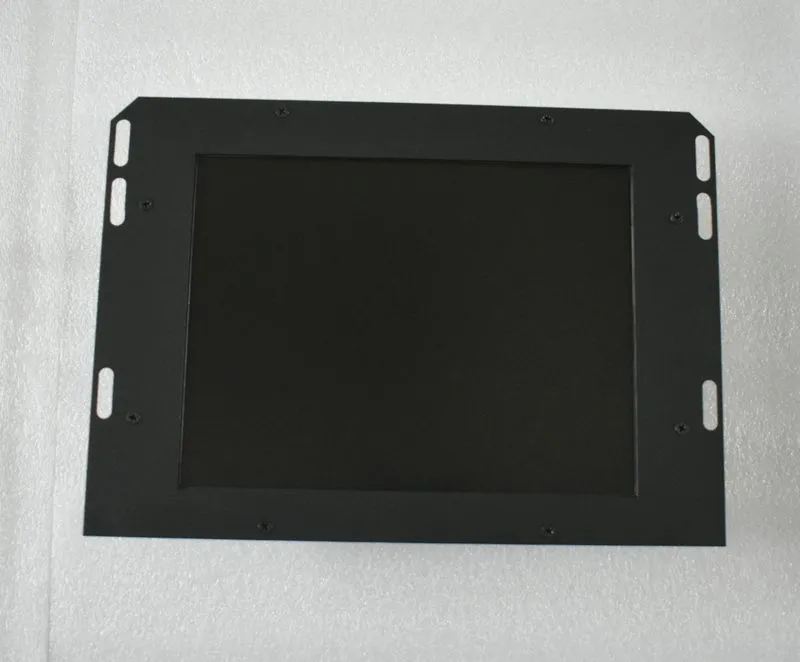
Is your HAAS VF-1, VF-2, or VF-3 vertical machining center's CRT monitor flickering, dim, or completely dead? You're not alone. The HAAS 28HM-NM4 monochrome CRT display (also listed as 93-5220C or 93-5220) has been discontinued for years, and every day more of these aging monitors fail in shops worldwide.
This comprehensive guide covers everything you need to know: how to diagnose CRT failure symptoms, identify your exact monitor model, compare your options (repair vs. replace vs. upgrade), and complete the installation yourself in under 15 minutes.
Safety note: HAAS Classic Control CRTs run on 12V DC internally, but the CRT anode still holds 12-15 kV. Discharge before handling any internal components.
1. HAAS CRT Monitor Model Identification
Before purchasing any replacement, verify your HAAS monitor model. The HAAS 28HM-NM4 is the most common 12-inch monochrome CRT used across VF Series machines.
HAAS Monitor Cross-Reference Table
| OEM Part Number | Alternate #1 | Alternate #2 | Screen Type | Size | Interface | Compatible Machines |
|---|---|---|---|---|---|---|
| 28HM-NM4 | 93-5220C | 93-5220 | Monochrome Amber CRT | 12" (12.1") | 9-pin D-Sub | VF-1, VF-2, VF-3, VF-4, VF-6 |
| 93-5222 | — | — | Monochrome CRT | 10" | 9-pin D-Sub | VF-0, VF-1 (early) |
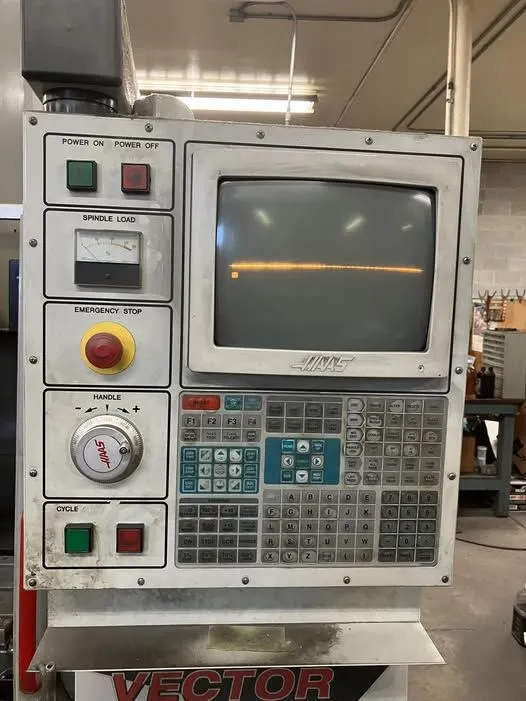
2. Common HAAS CRT Failure Symptoms
If your HAAS machine display shows any of the following symptoms, the CRT is approaching end-of-life:
| Symptom | Likely Cause | Severity | Can It Be Repaired? |
|---|---|---|---|
| Dim or faded display | CRT phosphor degradation | Progressive | No — permanent wear |
| Flickering or unstable image | Flyback transformer failure | Critical | Temporary (component-level) |
| No display / black screen | High-voltage circuit failure | Critical | Often uneconomical |
| Vertical or horizontal collapse | Deflection circuit failure | Critical | Possible but expensive |
| Screen burn-in (raster visible) | Phosphor aging | Progressive | No — permanent damage |
| High-pitched whining noise | Flyback transformer / yoke | Warning | Temporary |
| Intermittent operation | Cold solder joints / aging caps | Unpredictable | Possible but unreliable |
Quick Diagnosis Flow
Run through these steps in order — most HAAS "no display" faults are connector-related and cost nothing to check:
- Check the 9-pin connector — Most common failure. Remove, inspect for bent pins, clean with contact cleaner, re-tighten the thumbscrews firmly.
- Measure pin 2 voltage — Should read +12V DC. Zero volts means a blown fuse on the I/O board (F2 on most Classic Control boards).
- Adjust the brightness pot — Front-panel brightness knob; turn fully clockwise. No response means CRT tube or flyback failure.
- Look for bulging caps — Remove the CRT housing. Swollen electrolytics on the power board are common after 10-15 years.
- Swap test — Connect a Kongto HAAS LCD kit. If it displays, the CRT is confirmed dead.
3. Original CRT vs. Kongto LCD — Technical Comparison
The following table shows exactly what you gain by upgrading from the original HAAS monochrome CRT to a modern industrial LCD:
| Specification | Original HAAS 28HM-NM4 CRT | Kongto 12.1" LCD Upgrade | Improvement |
|---|---|---|---|
| Display Technology | Monochrome Amber CRT | TFT-LCD Industrial Panel | Modern technology |
| Screen Size | 12.1" (actual) / 12" (nominal) | 12.1" LED-backlit | Identical fit |
| Resolution | 640x350 pixels | 800x600 pixels | +114% sharper |
| Brightness | ~150 cd/m2 | 350-450 cd/m2 | 2.3-3x brighter |
| Contrast Ratio | ~500:1 (typical CRT) | 1000:1 (typical) | 2x better |
| Operational Lifespan | ~10,000-15,000 hours | 50,000+ hours | 3-5x longer |
| Power Consumption | ~80W (with heater) | ~15W | 81% less power |
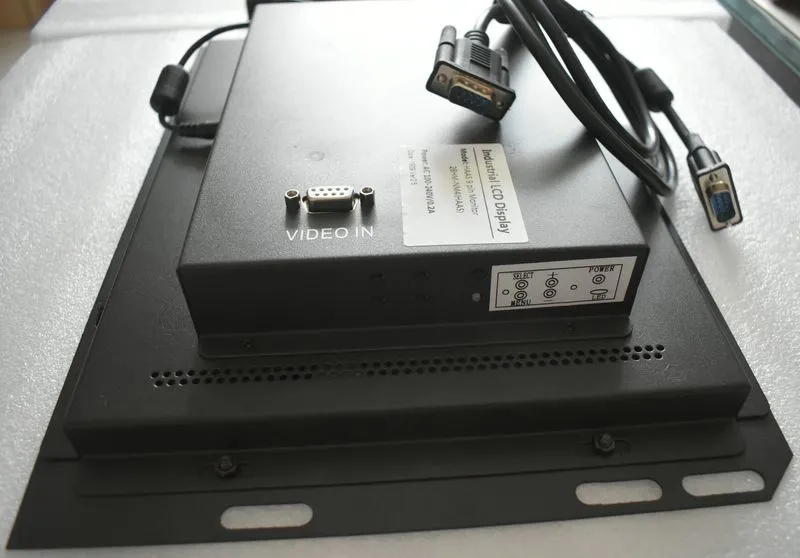
| Signal Interface | 9-pin D-Sub | 9-pin D-Sub (original harness) | No rewiring needed |
| Power Input | DC 12V from controller | DC 12V (original power) | No PSU needed |
| Operating Temperature | 0~40°C | -10~+60°C | Broader range |
| Safety | High voltage (12-15kV anode) | Low voltage DC (safe) | No HV hazard |
| Weight | ~4.5 kg (10 lbs) | ~1.2 kg (2.6 lbs) | 73% lighter |
| Availability | Discontinued (scarce) | In stock, ships within 24h | Immediate |
| Warranty | None (used/no support) | 2-year warranty + lifetime support | Full peace of mind |
4. Installation Guide (10-15 Minutes)
This upgrade requires no special tools, no wiring modifications, and no CNC parameter changes. Here is the complete installation process:
Step 1: Power Down
Turn off the main disconnect switch on the back of the HAAS machine. Wait 2 minutes for internal capacitors to discharge. Confirm the control panel screen is completely dark.
Step 2: Remove CRT
Unscrew the 4 mounting screws on the CRT bezel. Slide the CRT forward carefully. Disconnect the 9-pin D-Sub signal cable and DC 12V power connector from the back of the CRT unit.
Step 3: Install LCD
Place the 12.1-inch LCD module into the original mounting frame. The screw holes align 100% with the original CRT positions. Secure with the original screws. No drilling or adapters needed.
Step 4: Connect Cables
Plug the original 9-pin D-Sub cable into the LCD module signal input. Connect the DC 12V power cable. Both connectors are keyed — they only fit one way, so incorrect insertion is impossible.
Step 5: Power On
Restore main power and start the HAAS machine. The LCD will display the HAAS control interface automatically. Use the OSD buttons on the LCD module to adjust brightness, contrast, and screen position to your preference.
5. Cost Comparison: Repair vs. Replace vs. Upgrade
| Option | Estimated Cost | Time | Result | Warranty |
|---|---|---|---|---|
| Repair existing CRT | $200-600 | 1-4 weeks | Temporary fix (3-12 months) | Usually none |
| Buy used CRT (eBay/auction) | $400-1,200 | 2-14 days | Unknown remaining life | None |
| OEM LCD kit (HAAS) | $2,000-4,000 | 4-8 weeks | New but expensive | 90 days |
| Kongto LCD Upgrade | $399 | Same day (in-stock) | New, brighter, longer life | 2 years |
HAAS 9-Pin D-Sub Connector Pinout
Proprietary HAAS pinout verified against 28HM-NM4 and 93-5220C CRTs. HAAS uses a 9-pin male D-Sub on the CRT side; the female connector on the machine side uses standard D-Sub pins.
| Pin | Signal | Wire Color (typical) | Notes |
|---|---|---|---|
| 1 | GND | Black | Signal + chassis ground |
| 2 | +12V DC | Red | CRT power input |
| 3 | Composite video | White | Monochrome video signal |
| 4 | GND | Black | Video return |
| 5 | GND | Black | Auxiliary ground |
| 6 | N/C | — | Not connected |
| 7 | N/C | — | Not connected |
| 8 | N/C | — | Not connected |
| 9 | +12V return | Red/black | Power return |
Real-World HAAS CRT Failure Data
Based on 120+ HAAS CRT failure cases handled by Kongto (2024-2026):
- The 9-pin D-Sub connector accounts for 30% of reported "no display" issues — usually cured by cleaning and reseating.
- 35% are CRT power board capacitor failures — bulging 470uF/25V caps are the telltale sign.
- 20% are CRT tube aging (dim display progressing to black) — not economically repairable.
- 15% are I/O board fuse failures — fuse F2 (3A slow-blow) on Classic Control boards.
- Average HAAS 28HM-NM4 CRT lifespan: 12-15 years before first failure.
6. Frequently Asked Questions
A: Early HAAS Classic Control machines (pre-1995) used a round 9-pin Amphenol connector. We have adapter cables available — email [email protected] with a photo for same-day confirmation.
A: Yes. All HAAS VF-1 through VF-6 machines with Classic Control (early 1990s through ~2008) use the same 9-pin monochrome CRT interface. The upgrade is compatible regardless of the machine's age.
A: No. This is an outright purchase. You keep your old CRT — no core charge, no return shipping, no deposit.
A: The LCD replacement displays in crisp monochrome (white/black). If you prefer the amber tint for night shift operation, the OSD menu allows you to adjust color temperature to a warm tone.
A: We ship from Shenzhen, China via DHL/FedEx. Delivery to the US and Europe takes 3-7 business days. .
Ready to upgrade your HAAS VF display?
- In Stock - 2-Year Warranty
Reply within 24 hours
[email protected] | +86-13686889647 | WhatsApp