Mitsubishi MDT962B Series CNC CRT to LCD Upgrade Guide
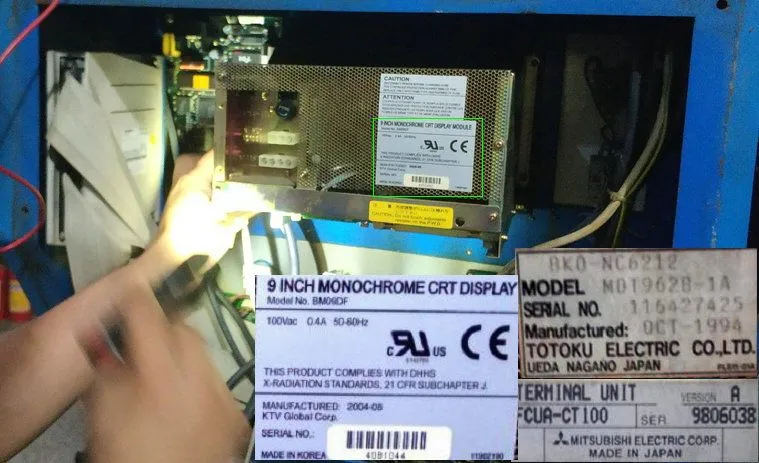
Mitsubishi MDT962B series CRT monitors are among the most widely used displays on Mitsubishi MELDAS and M-series CNC controls. Found on M64, E60, M50, M500, M520, and M3/M310 machining centers, these 9-inch monochrome CRTs are now failing at increasing rates as their components age beyond their design life.
This guide covers the complete MDT962B family (including MDT962B-1A and MDT962B-4A), as well as compatible models BM09DF, FCUA-CT100, and MDT947B. (The 12-inch MDT1283B is sometimes grouped with Mitsubishi models, but it is a Totoku-built display for Mazak Mazatrol controls — see the Mazak MDT1283B page.) You'll find model cross-references, interface specifications, installation steps, and pricing for each option.
Mitsubishi CRT Model Cross-Reference
Use the table below to identify your Mitsubishi CRT monitor:
| Model | CRT Type | Size | Interface | LCD Size | Price | Compatible CNC Controls |
|---|---|---|---|---|---|---|
| MDT962B | Monochrome | 9" | 10-pin flat cable | 8" LCD | $175 | M64, E60, M50, M500, M520 |
| MDT962B-1A | Monochrome | 9" | 10-pin flat cable | 8" LCD | $175 | M64, E60, M50, M500 |
| MDT962B-4A | Monochrome | 9" | 10-pin flat cable | 8" LCD | $175 | M64, M3, M310 |
| BM09DF | Monochrome | 9" | 10-pin flat cable | 8" LCD | $175 | M64, E60, M500, M520 |
| FCUA-CT100 | Monochrome | 9" | 10-pin flat cable | 8" LCD | $175 | M64, E60, M500 |
| MDT947B | Monochrome | 9" | 10-pin flat cable | 8" LCD | $280 | M64, M50, M500 |
| MDT925PS | Monochrome | 9" | Mitsubishi 10-pin | 8" TFT | $480 | M500, M520, M60, M64, M70, M700 |
Compatible Mitsubishi CNC Systems
| CNC Series | Typical Machines | CRT Models Used | Compatible LCD Kit |
|---|---|---|---|
| MELDAS M64 | Machining centers, mills | MDT962B, BM09DF | $175 kit |
| MELDAS E60 | Lathes, grinders | MDT962B, FCUA-CT100 | $175 kit |
| MELDAS M50/M500 | Machining centers | MDT962B, MDT947B | $175-280 |
| MELDAS M520 | High-speed mills | MDT962B, MDT947B | $175-280 |
| MELDAS M3/M310 | Small machining centers | MDT962B-4A | $299 kit |
CRT Failure Symptoms on Mitsubishi Systems
| Symptom | Likely Cause | Solution |
|---|---|---|
| Dim display / low contrast | CRT phosphor degradation, tube aging | LCD upgrade (permanent) |
| Flickering or rolling image | Sync circuit / flyback transformer | LCD upgrade |
| Black screen (power LED on) | High-voltage failure, tube dead | LCD upgrade |
| Smeared or stretched characters | Deflection circuit, yoke failure | LCD upgrade |
| Intermittent display / power cycling | Capacitor failure, cold joints | LCD upgrade (temporary repair possible) |
| High-pitched whine | Flyback transformer oscillation | LCD upgrade (safety concern) |
Model-specific failure patterns on Mitsubishi systems: the MDT962B most often shows a blank screen from flyback transformer failure; the FCUA-CT100 goes dim as CRT phosphor wears; the BM09DF flickers from capacitor degradation in the power supply circuit; and the MDT925PS displays intermittently due to loose internal connectors or cold solder joints. All are permanently resolved by an LCD upgrade.
MDT962B CRT vs Kongto LCD — Technical Comparison
| Specification | Original Mitsubishi CRT | Kongto LCD Upgrade |
|---|---|---|
| Display Technology | 9" Monochrome CRT | TFT-LCD Industrial Panel |
| Screen Size | 9" | 8" LED-backlit LCD |
| Resolution | 640x400 | 800x600 |
| Brightness | ~200 cd/m2 | 350-450 cd/m2 |
| Contrast Ratio | ~500:1 | 1000:1 |
| Lifespan | ~15,000 hours | 50,000+ hours |
| Power | ~25W | ~10W |
| Interface | 10-pin flat ribbon cable | 10-pin matching connector |
| Power Supply | AC 100-240V | AC 100-240V (original) |
| Weight | ~3.5 kg | ~1.0 kg |
| Operating Temp | 0~40C | -10~+60C |
| Safety | High voltage (10kV+) | Low voltage (no HV anode) |
Mitsubishi LCD Upgrade Products
Installation Steps
1. Power Down
Turn off CNC main power. Disconnect the machine from mains. Wait 1 minute for capacitor discharge.
2. Remove CRT
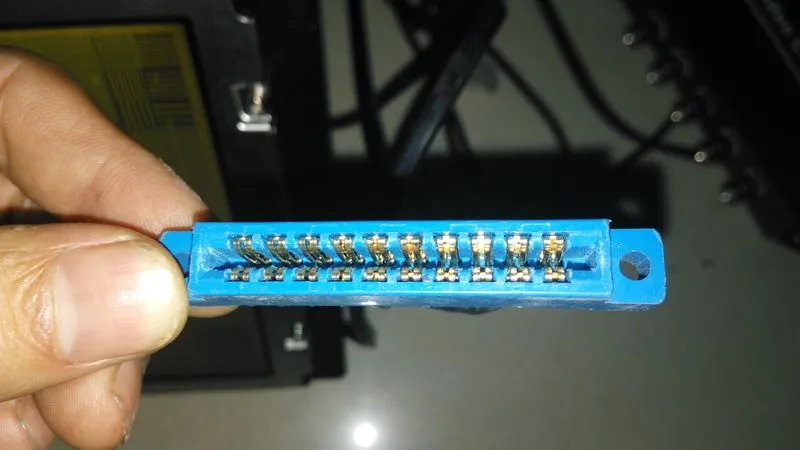
Unscrew the 4 mounting screws. Slide the CRT housing forward. Disconnect the 10-pin flat cable and DC power wires.
3. Install LCD
Place the LCD module into the original mounting frame. Holes align 100%. Secure with original screws.
4. Connect Cables
Plug the 10-pin flat cable into the LCD module connector. Connect DC power. Keyed connectors prevent errors.
5. Power On
Restore power and start the CNC. The LCD displays automatically. Use OSD buttons to adjust brightness.
Frequently Asked Questions
A: Yes. MDT962B, MDT962B-1A, MDT962B-4A, BM09DF, and FCUA-CT100 all use the same 10-pin flat ribbon cable interface. Our LCD modules are designed to match this connector directly.
A: The MDT962B-1A CRT runs on AC 100-240V (50/60 Hz) from the control cabinet supply, not DC 24V. Our LCD module uses the same AC 100-240V input.
A: No. The LCD module uses the same video signal format as the original CRT. No parameter changes are needed on the Mitsubishi CNC control.
A: Check the label on the back of the CRT. MDT962B-1A and MDT962B-4A are sub-variants with different mounting bracket designs. All three use the same LCD module.