Siemens Sinumerik CRT to LCD Upgrade Guide
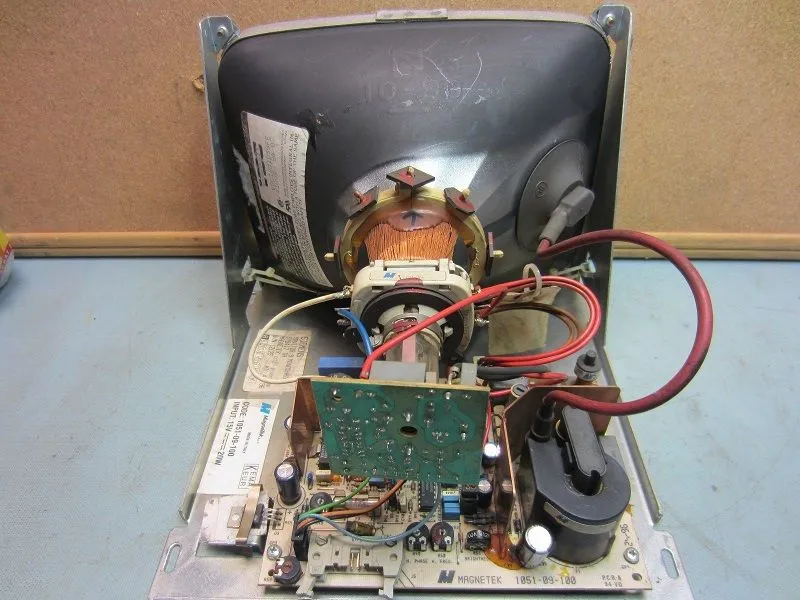
Siemens Sinumerik 810, 810D, 820, 820M, and 840D (Power Line) controls are among the most reliable CNC systems ever built — and their aging CRT displays are now failing. The 6FC3988-7FA20, SM0901, 579417TA, and 6FC4600-0AR04 models are widely used across these platforms, including 8.4-inch, 9-inch, and 10.4-inch industrial control CRT form factors.
Critical difference from Fanuc/Mitsubishi: Siemens Sinumerik CRTs are powered through the signal cable, not by DC 24V. Our LCD modules take the same signal-cable feed, so they are directly compatible. Confirm your system model before ordering.
Siemens CRT Model Cross-Reference
| Model | CRT Type | Size | Interface | Power | LCD Size | Price | Compatible Systems |
|---|---|---|---|---|---|---|---|
| 6FC3988-7FA20 | Monochrome | 9" | 2-row 16-pin | Via signal cable | 8" LCD | $399 | Sinumerik 810D, 840D |
| SM0901 | Monochrome | 9" | 2-row 16-pin | Via signal cable | 8" LCD | $399 | Sinumerik 810, 820 |
| 579417TA | Monochrome | 9" | 2-row 16-pin | Via signal cable | 8" LCD | $399 | Sinumerik 810D, 820D |
| 6FC4600-0AR04 | Color CRT | 10.4" | 2-row 16-pin | Via signal cable | 10.4" LCD | $399 | Sinumerik 840D sl |
| 6FC5103 | Color CRT | 14" | 2-row 16-pin | Via signal cable | 12.1" LCD | $399 | Sinumerik 840C, 840CE |
| 6FC5203 | Color CRT | 14" | 2-row 16-pin | Via signal cable | 12.1" LCD | $399 | Sinumerik 840D, 810D |
| SM1200 | Monochrome | 12" | 2-row 16-pin | Via signal cable | 10.4" LCD | $399 | Sinumerik 810T, 820T |
SINUMERIK System Compatibility Guide
SINUMERIK 808D (entry-level)
The 808D uses a compact color LCD (typically 7" or 10"). These are still in production and replacements are available from Siemens. No upgrade urgency unless the display is physically damaged.
SINUMERIK 828D (mid-range)
The 828D uses a 10.4" color TFT display (part number 6FC5203 series). These are still available but expensive (~$2,000–$2,500 from Siemens). Third-party replacements from Kongto cost significantly less. View replacement →
SINUMERIK 840C (high-end, 1990s)
The 840C was a flagship CNC used on large mills, transfer lines, and heavy machinery. Its CRT displays (9" mono or 14" color) are now 25-35 years old. Siemens has discontinued all 840C display parts.
Good news: The 840C uses the same signal interface as the 810/820/880 family. Our KTV-series modules are confirmed compatible. See our 840C-specific guide →
SINUMERIK 810D / 840D (powerful, older)
Most display failures happen here. These systems from the early 2000s used the 6FC3988 series and SM0901. They are now 15-20 years old and failing regularly. Siemens has discontinued most of these displays.
Upgrade strongly recommended — don't wait for failure. If you have a 810D/840D machine, proactively upgrade. Our factory-direct modules start at $399 with a 2-year warranty.
SINUMERIK 840D sl / 828D sl (newer)
The "sl" (solution line) systems use modern color LCDs with standard interfaces. These displays are still available from Siemens, though third-party options offer better value and faster delivery.
SINUMERIK 850 / 880 (legacy)
The 850 and 880 controls from the 1980s-1990s use the 6FC3988-7FA20 CRT display. These are long discontinued. See replacement →
Product Deep Dives
6FC3988-7FA20 — The Most Common Siemens Display
6FC3988-7FA20 is a 9" monochrome CRT/LCD found on SINUMERIK 810D/840D controls. It is the display that fails most often and the one we sell most replacements for. Common failure: backlight goes dark (CCFL tube burnout) or video board stops outputting image. Our replacement module is a direct drop-in — same mounting holes, same connector, same power.
6FC3988-7FA20 — SINUMERIK 850/880 Display
The 6FC3988-7FA20 is a variant used on the larger SINUMERIK 850 and 880 controls. Functionally similar to the 6FC3988 but with slight differences in mounting bracket and cable routing. Our replacement module covers both.
6FC5103-0AB01 — 840C/840CE Color CRT Upgrade
The 6FC5103-0AB01 is a color CRT used on SINUMERIK 840C/840CE controls. Our replacement module includes the correct interface cable for a clean drop-in fit.
SM0901 / 579417 TA — Siemens-Indramat Display
The SM0901 (also labeled 579417 TA) is a 9" display used on SINUMERIK 810D/840D and some Indramat (Bosch Rexroth) controls. Because it cross-brands, getting a replacement from either Siemens or Indramat is slow. Our LCD module replaces it regardless of which CNC control it is connected to.
SM1200 — 840D Power Line Color TFT
The SM1200 (6FC5221-0AA01) is a 12.1" color TFT display used on SINUMERIK 840D Power Line systems. It is a higher-end display compared to the monochrome units. Our KTV121 replacement is a factory-direct alternative at a fraction of the Siemens OEM price.
8.4" Industrial CRT — Compact Siemens Display
The 8.4" industrial CRT was used on SINUMERIK 810/820/840D systems where panel space was limited. Our LCD replacement matches the compact footprint.
CRT Failure Symptoms
| Symptom | Cause | Action |
|---|---|---|
| No display, LED off | Power supply failure | LCD upgrade |
| Dim image | CRT aging | LCD upgrade |
| Flickering | Flyback / HV | LCD upgrade |
| Geometry distortion | Deflection circuit | LCD upgrade |
Specification Comparison
| Spec | Siemens CRT | Kongto LCD |
|---|---|---|
| Resolution | 640x400 | 800x600 |
| Brightness | ~200 cd/m2 | 350-450 cd/m2 |
| Lifespan | ~15,000 hrs | 50,000+ hrs |
| Interface | 2-row 16-pin | 2-row 16-pin direct |
Installation
1. Power Down
Turn off Sinumerik system. Unplug AC power. Wait 2 minutes.
2. Remove CRT
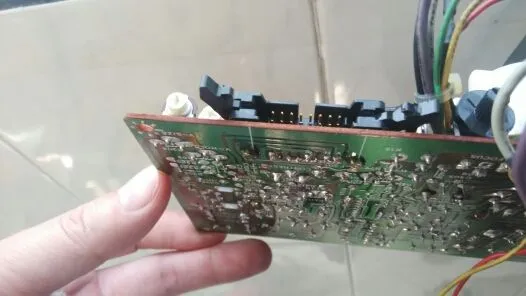
Unscrew the CRT housing. Disconnect 2-row 16-pin signal cable and AC power wires.
3. Install LCD
Mount LCD module. Holes align 100% with original CRT positions.
4. Connect
Plug 2-row 16-pin cable into LCD module. Connect AC power. Keyed connectors prevent errors.
5. Test
Power on. LCD displays automatically. Adjust OSD.