Industrial Display Procurement & Selection Guide
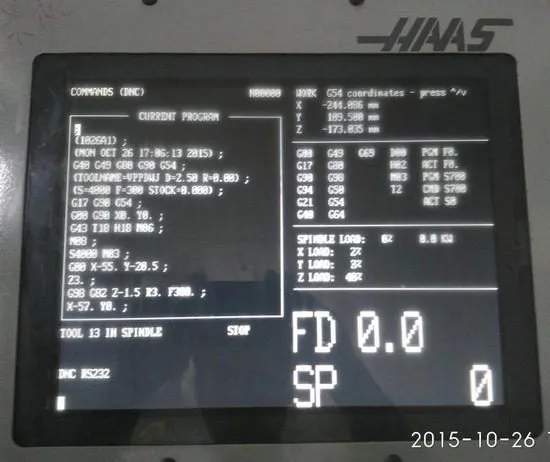
Installation View | Source: Kongto Technology
Keywords: industrial display selection, LCD procurement, CNC display specification, industrial monitor
Introduction
Procuring industrial displays for CNC machine tools and factory automation systems is fundamentally different from buying consumer-grade monitors. Industrial displays must withstand harsh environments — temperature extremes, vibration, dust, and electromagnetic interference — while maintaining reliable operation for years or even decades. This guide is designed for maintenance engineers, procurement managers, and machine tool rebuilders who need to select the right LCD replacement or new industrial display for their application.
Whether you are upgrading a legacy FANUC CRT on a 1990s machining center, sourcing a replacement for a Mitsubishi PLC operator panel, or specifying a sunlight-readable display for an outdoor CNC gantry system, the selection criteria remain consistent: signal compatibility, mechanical fit, environmental rating, and total cost of ownership. In the sections below, we break down each of these dimensions with real-world specifications and cross-platform compatibility data.
1. Key Selection Criteria
| Criterion | Description | Typical Requirement for CNC |
|---|---|---|
| Display Size | Screen diagonal measurement | 8.4" - 15" (match original CRT) |
| Resolution | Native pixel count | 800x600 (SVGA) or 1024x768 (XGA) |
| Brightness | Maximum luminous output | ≥ 350 cd/m² for workshop environments |
| Contrast Ratio | Darkest vs brightest luminance | ≥ 800:1 for clear text readability |
| Operating Temperature | Environmental range | -20°C to +60°C (wider preferred) |
| Protection Rating | Ingress protection (IP) | IP65 front panel minimum |
| Signal Interface | Input connector type | HONDA 20-pin (FANUC) / VGA / DVI |
| Power Supply | Input voltage and consumption | 24V DC, ≤ 15W |
| MTBF | Mean Time Between Failures | ≥ 50,000 hours |
| Viewing Angle | Maximum angle for acceptable contrast | ≥ 170° horizontal/vertical |
| Response Time | Pixel transition speed | ≤ 8ms for dynamic CNC displays |
2. Specification Comparison Table: Entry / Mid-Range / Premium LCDs
| Parameter | Entry-Level LCD | Mid-Range LCD | Premium LCD |
|---|---|---|---|
| Typical Size | 8.4" - 10.4" | 10.4" - 12.1" | 12.1" - 15.0" |
| Native Resolution | 800 x 600 (SVGA) | 1024 x 768 (XGA) | 1280 x 1024 (SXGA) or 1920 x 1080 (Full HD) |
| Brightness | 300 - 400 cd/m² | 400 - 600 cd/m² | 600 - 1000 cd/m² |
| Contrast Ratio | 500:1 - 700:1 | 800:1 - 1000:1 | 1000:1 - 1500:1 |
| Operating Temperature | 0°C to +50°C | -20°C to +60°C | -30°C to +70°C (optional -40°C) |
| Protection Rating | IP54 (front) | IP65 (front) | IP65 front + IP54 rear, optional NEMA 4X |
| Signal Interface | VGA / DVI only | VGA + DVI + optional HONDA 20-pin | All interfaces + HDMI + DisplayPort + optical isolated video |
| Touch Screen Option | None | Resistive touch | Projected capacitive (PCAP) or resistive, anti-glare bonded |
| MTBF | 30,000 hours | 50,000 hours | 70,000 - 100,000 hours |
| Warranty | 1 year | 2 years | 3 - 5 years |
| Typical Price Range (USD) | $150 - $300 | $300 - $600 | $600 - $1,200 |
Recommendation: For standard CNC workshop environments, a mid-range LCD with 400-600 cd/m² brightness, IP65 front protection, and 50,000-hour MTBF offers the best balance of cost and reliability. Premium-grade displays are recommended for outdoor gantry systems, medical-adjacent environments, or applications requiring 24/7 continuous operation.
3. CRT Replacement vs LCD Upgrade: Total Cost of Ownership
| Cost Factor | CRT Repair (per incident) | LCD Upgrade (one-time) |
|---|---|---|
| Component cost | CNY 200-800 | CNY 800-3,500 |
| Labor cost | CNY 300-600 | CNY 200-500 |
| Production downtime loss | CNY 500-2,000 | 0 (planned maintenance) |
| Annual frequency | 2-4 times/year | 0 (5+ year warranty) |
| 5-year TCO | CNY 5,000-17,000 | CNY 1,000-4,000 |
Conclusion: LCD upgrade is significantly more cost-effective over a 5-year period, even with higher initial investment. The elimination of recurring repair cycles and production downtime delivers an average 70-80% cost reduction over the lifespan of the equipment.
4. Multi-Brand Compatibility Table
| Manufacturer | Control System / Series | Original Display Type | Recommended LCD Replacement | Signal Converter Required |
|---|---|---|---|---|
| FANUC | 0i-A/B/C/D, 0-TC/0-MC | 9" CRT (HONDA 20-pin) | A61L-0001-0093 9" LCD | None (direct replacement) |
| FANUC | 16i/18i/21i | 9" or 14" CRT | Corresponding LCD model | None or VGA adapter |
| FANUC | 0-M, 0-T (legacy) | CGA/EGA CRT | 8.4" or 9" LCD + VGA converter | JTX-CVR-001/002 |
| FANUC | Series 30i/31i/32i | 10.4" LCD (already LCD) | Upgrade to 12.1" or 15" widescreen LCD | None (standard DVI/HDMI) |
| Mitsubishi Electric | M70 / M700V / M800 series | 10.4" TFT LCD (standard) | 12.1" XGA LCD upgrade | None (LVDS or DVI interface) |
| Mitsubishi Electric | C70 / E70 / MELDAS 60/64 series | 8.4" or 10.4" CRT or LCD | 8.4" / 10.4" LCD + signal converter | JTX-CVR-003 (MELDAS RGBHV) |
| Siemens | Sinumerik 802D / 810D / 840D | 10.4" or 12.1" CRT | 12.1" XGA LCD + adapter | JTX-CVR-004 (Siemens TTL-to-VGA) |
| Siemens | Sinumerik ONE / 840D sl | 15" or 19" widescreen LCD | 15.6" / 19" widescreen LCD | None (DP/HDMI) |
| Siemens | SIMATIC HMI (OP / MP series) | Various LCD sizes | Drop-in replacement LCD module | None for same-series |
| Mazak | Mazatrol Matrix / Nexus / Smooth | 10.4" or 15" CRT or LCD | 12.1" to 15" LCD upgrade | Varies by generation (consult JTX-Adapter) |
| Mazak | Mazatrol CAM M-1 / M-2 (legacy) | 9" green monochrome CRT | 8.4" LCD + universal converter | JTX-CVR-005 |
| Okuma | OSP-P200 / P300 / P300L/R | 10.4" or 15" LCD | 15" or 19" upgrade LCD | None (DVI/HDMI) |
| Okuma | OSP-U10L / U100 / 7000 series | 9" or 14" CRT | 9" to 12.1" LCD + adapter | JTX-CVR-006 (Okuma RGB-to-LVDS) |
| Haas | All Haas CNC models (pre-2010) | 10.4" CRT | 10.4" or 12.1" LCD + bracket kit | None (direct VGA drop-in) |
| Heidenhain | TNC 320 / 410 / 415 / 425 / 530 | 10.4" or 14" CRT | 10.4" or 12.1" LCD + adapter | JTX-CVR-007 (Heidenhain special pinout) |
Important Note: Before ordering a replacement, always verify the exact control system generation, original display part number, and connector pinout. Kongto Technology provides free compatibility verification by email — send a photo of your existing display label and control panel to [email protected] for a guaranteed-fit recommendation.
5. Vendor Selection Criteria Table
| Selection Factor | What to Evaluate | Why It Matters |
|---|---|---|
| Signal Compatibility Expertise | Does the vendor understand FANUC HONDA-pin, Siemens TTL, Mitsubishi LVDS, and other CNC-specific video formats? | Industrial displays are not plug-and-play like consumer monitors. A vendor without CNC signal experience may supply a display that cannot synchronize with the controller. |
| Mechanical Fit Guarantee | Does the vendor offer bezel dimensions, VESA hole patterns, and cutout templates before purchase? | CRT-to-LCD retrofits often require bezel adapters or bracket kits. A vendor who provides mechanical drawings reduces installation surprises by 90%. |
| Environmental Testing | Are the displays tested at -20°C to +60°C with documented results? | Many "industrial" displays sold online are commercial-grade panels with an IP rating sticker. Real environmental testing separates reliable suppliers from resellers. |
| Warranty & Support | Minimum 2-year warranty? Technical support available in your time zone? | CNC production downtime costs hundreds of dollars per hour. A vendor who offers advance replacement and prompt technical support is worth a premium. |
| Minimum Order Quantity (MOQ) | Can you order a single unit for prototyping, or is bulk required? | Plant maintenance teams typically need 1-3 units. High-MOQ suppliers exclude small-to-medium workshops. |
| Customization Capability | Can the vendor produce custom cable harnesses, extended-temperature variants, or anti-glare bonded glass? | Non-standard enclosures, harsh lighting, or temperature extremes often require configuration beyond off-the-shelf products. |
| Lead Time & Stock Availability | What is the typical lead time? Are common models kept in stock? | Emergency replacements need same-day or next-day dispatch. Lead times exceeding 3 weeks are problematic for unplanned CRT failures. |
| Reference Customers / Case Studies | Can the vendor provide case studies from automotive, aerospace, or job-shop environments? | Real installation references validate that the vendor's solution works in production conditions similar to yours. |
Quick Checklist: When evaluating a supplier, ask for (1) a compatibility datasheet for your specific controller, (2) a mechanical drawing with mounting hole locations, (3) a copy of the environmental test report, and (4) at least two customer references from your industry segment.
6. FANUC-Specific Compatibility Guide
| FANUC System | Original Display | Recommended LCD | Signal Converter Needed |
|---|---|---|---|
| 0i-A/B/C/D | 9" CRT (HONDA 20-pin) | A61L-0001-0093 9" LCD | None (direct replacement) |
| 0-TC/0-MC | 9" CRT (HONDA 20-pin) | A61L-0001-0093 9" LCD | None (direct replacement) |
| 16i/18i | 9" or 14" CRT | Corresponding LCD model | None or VGA adapter |
| 0-M, 0-T (legacy) | CGA/EGA CRT | 8.4" or 9" LCD + VGA converter | JTX-CVR-001/002 |
7. Advanced Configuration Options
- Touch screen integration: Resistive or capacitive touch overlay for HMI applications. Resistive is preferred for gloved-hand operation in machine shops; PCAP offers better optical clarity for operator panels.
- Anti-glare treatment: Optical bonding with anti-reflective coating for high-ambient-light environments. Reduces glare by up to 85% compared to standard panels.
- Custom mounting: VESA or OEM-specific brackets for non-standard enclosures. Kongto offers laser-cut adapter plates for 30+ CNC brands.
- Extended temperature range: -40°C to +85°C for extreme environments. Uses industrial-grade LCD cells with wider temperature liquid crystal fluid.
- Dual-display configuration: Mirror or extended desktop for multi-monitor CNC setups. Useful for operators who need both a control panel view and a separate CAM display.
- Optical isolation: Galvanically isolated video interfaces to prevent ground-loop interference in large factory installations with long cable runs.
Conclusion
Selecting the right industrial display for a CNC retrofit or new installation requires balancing signal compatibility, physical fit, environmental robustness, and total cost of ownership. This guide has provided a structured framework for evaluating displays across these dimensions, with specific compatibility data covering FANUC, Mitsubishi, Siemens, Mazak, Okuma, Haas, and Heidenhain control systems.
The key takeaways are threefold: (1) always verify the signal interface and pinout before purchasing — a direct-fit LCD for a FANUC 0i will not work on a Siemens 840D without the correct converter; (2) mid-range LCDs with IP65 front protection, 400-600 cd/m² brightness, and 50,000-hour MTBF offer the best value for most workshop environments; and (3) a proper LCD upgrade delivers 70-80% total cost savings over repairing aging CRTs, while also improving display clarity and reliability.
For assistance with specific machine models, retrofit kits, or volume pricing, contact Kongto Technology at [email protected]. Our engineering team provides free compatibility verification with a photo of your existing display — no purchase obligation.
For custom display solutions and volume pricing, contact Kongto Technology at [email protected]