Video Signal Converter Selection Guide
Complete guide for selecting the right industrial video signal converter for your CNC and industrial applications. Whether you are upgrading a legacy CRT-based CNC machine or integrating modern HMI displays with older control systems, choosing the correct signal converter is critical for reliable operation and image quality.
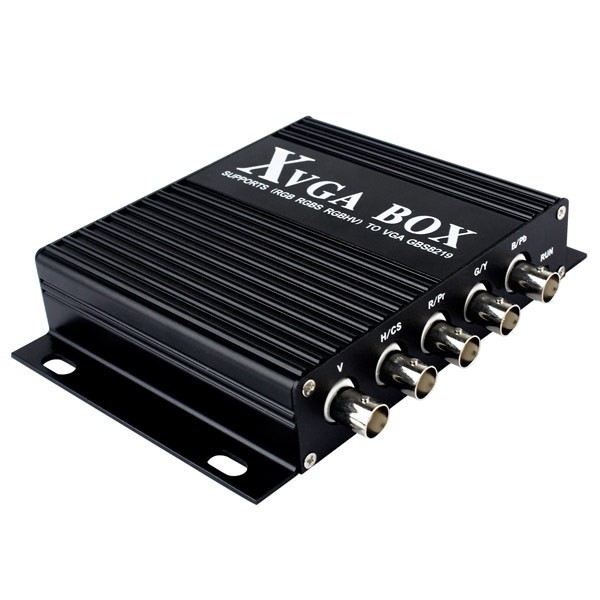
Converter Selection Matrix
| Converter Model | Input Signal | Output Signal | Best Application | Key Features |
|---|---|---|---|---|
| GBS-8219 | CGA/EGA/MDA/IBM 5150 | VGA/RGBHV | Industrial retrofits, legacy CNC systems | Multi-format support, 15kHz-64kHz scan rate |
| KT-HDMI-VGA | HDMI 1.4 | VGA + Audio | Modern displays, HMI integration | 1080p support, audio extraction, EDID passthrough |
| KT-VGA-HDMI | VGA (RGBHV) | HDMI 1.4 | Legacy equipment to modern displays | Upscaling to 1080p, audio embedding |
Technical Specifications Comparison
| Parameter | GBS-8219 | KT-HDMI-VGA | KT-VGA-HDMI |
|---|---|---|---|
| Input Resolution | CGA to XGA | Up to 1920x1080 | Up to 1920x1200 |
| Output Resolution | Up to 1280x1024 | Up to 1920x1080 | Up to 1920x1080 |
| Refresh Rate | 60Hz | 60Hz | 60Hz |
| Power Supply | 5V DC (USB or adapter) | 5V DC (USB-C) | 5V DC (USB) |
| Dimensions | 95x65x25mm | 60x45x15mm | 70x50x18mm |
| Operating Temp | -20C to +60C | -10C to +50C | -10C to +50C |
VGA to VIDEO vs HDMI to VGA Comparison Table
Understanding the fundamental differences between VGA-to-VIDEO (composite) converters and HDMI-to-VGA converters is essential for making an informed choice. These two converter families serve very different signal paths and application scenarios.
| Parameter | VGA to VIDEO (Composite) | HDMI to VGA |
|---|---|---|
| Resolution | NTSC 720x480 / PAL 720x576 —standard-definition output only; significantly lower than VGA source resolution. Image sharpness is lost in the composite encoding process. | Up to 1920x1080 (1080p) —maintains full HD resolution. Digital-to-analog conversion preserves pixel-for-pixel accuracy at the target resolution. |
| Compatibility | Works with older CRT TVs, composite CCTV monitors, and some legacy analog recording equipment. Cannot drive modern VGA or HDMI monitors directly without additional conversion stages. | Standard PC monitors (VGA input), projectors, and industrial displays with DB15 VGA ports. Most monitors support 1920x1080 @60Hz over VGA without issues. |
| Cost | $10-$30 typical retail. Low component cost because composite encoders are mature, mass-produced ICs. Suitable for budget-restricted projects where resolution is not critical. | $15-$45 typical retail, depending on audio support, EDID emulation, and build quality. Slightly higher due to TMDS deserialization and DAC stages. |
| Use Case | Sending analog video to legacy composite monitors, connecting retro gaming systems to old TVs, or recording VGA output to analog VCR/DVR equipment. Not recommended for any CNC application where text readability matters. | Connecting modern HDMI sources (PCs, laptops, media players, HMI panels) to VGA-only industrial displays, projectors, or older monitors. The primary choice for HMI-to-industrial-display integration. |
| Verdict | Use only when the target display is composite-only and VGA is unavailable. Avoid for CNC work —the resolution loss makes control text and axis readouts unreadable. | Recommended for most industrial connections between modern digital sources and VGA displays. Reliable, high-resolution, and widely supported. |
CNC System Compatibility Table
Different CNC brands and controller generations output different video signal types. Use this table to identify which converter matches your specific CNC system.
| CNC Brand / System | Typical Output Signal | Recommended Converter | Notes |
|---|---|---|---|
| FANUC Series 0 / 6 / 10 / 11 / 15 | CGA (15.75kHz), EGA (21.8kHz) | GBS-8219 | These early-model FANUC controllers use TTL-level CGA/EGA signals, not standard analog VGA. The GBS-8219 handles the unique 9-pin D-sub timing and sync polarity these systems require. |
| FANUC Series 16 / 18 / 21 (later revisions) | VGA (RGBHV, 31.5kHz) | KT-VGA-HDMI (if display is HDMI); direct VGA connection if display has VGA input | Later FANUC models output standard analog VGA. If your replacement LCD has only HDMI input, the KT-VGA-HDMI provides clean upscaling. |
| Siemens Sinumerik 810 / 840D | VGA (analog RGB, separate H/V sync) | KT-VGA-HDMI | Siemens systems output standard VGA timing. The KT-VGA-HDMI upscales to match modern LCD native resolutions for a sharp, flicker-free image. |
| Mitsubishi M70 / M80 / E70 | VGA or DVI (depending on panel module) | KT-VGA-HDMI or GBS-8219 | Check the specific panel module. Earlier Mitsubishi panels use proprietary pinouts; the GBS-8219 with appropriate adapter cable may be needed for pre-2005 models. |
| Mazak Mazatrol (T1 / T2 / T3 / Fusion) | EGA / proprietary multi-sync | GBS-8219 | Mazak Mazatrol controllers often use EGA timing with custom sync configurations. The GBS-8219's auto-sync detection (15kHz-64kHz) handles these edge cases. |
| Okuma OSP (P200 / P300 / earlier) | VGA (standard) | KT-VGA-HDMI (if needed) | Okuma OSP systems from the 2000s onward use standard VGA output. Direct VGA-to-VGA is preferred when the display supports it. |
| Haas (all models) | VGA (standard 31.5kHz) | Direct VGA or KT-VGA-HDMI | Haas machines use standard VGA output. A simple VGA cable is sufficient for a VGA display. Use KT-VGA-HDMI when upgrading to an HDMI-only LCD monitor. |
| Heidenhain TNC (310 / 320 / 360 / 4xx / 5xx) | VGA / proprietary flat-panel LVDS | GBS-8219 (older models) / KT-VGA-HDMI (newer) | Very early Heidenhain TNC controllers use non-standard video timing. Identify the exact TNC model and check the original monitor connector type before selecting. |
| Modern PC-based CNC (Mach3 / LinuxCNC / UCCNC) | HDMI or DisplayPort | KT-HDMI-VGA | PC-based CNC controllers output standard digital video. Use KT-HDMI-VGA when the industrial display has only VGA input. |
Decision Matrix
Use this decision matrix to systematically narrow down which converter type you need. Answer each question in order —your answers will lead to a clear recommendation.
| Question | Answer Options | Your Answer (check one) | Recommended Converter |
|---|---|---|---|
| Q1: What signal does your CNC controller output? | a) CGA/EGA/MDA (TTL-level, 9-pin or 6-pin connector) b) VGA (analog RGB, DB15 connector) c) HDMI / DVI (digital video) | a ______ b ______ c ______ | a) GBS-8219 b) Go to Q2 c) Go to Q3 |
| Q2: If VGA output —what input does your display accept? | a) VGA (DB15) b) HDMI c) DVI | a ______ b ______ c ______ | a) Direct VGA cable —no converter needed b) KT-VGA-HDMI c) VGA-to-DVI adapter (passive, no conversion IC needed) |
| Q3: If HDMI/DVI output —what input does your display accept? | a) VGA (DB15) b) HDMI c) DVI | a ______ b ______ c ______ | a) KT-HDMI-VGA b) Direct HDMI cable —no converter needed c) HDMI-to-DVI cable (passive, same digital protocol) |
| Q4: Does your system use a non-standard scan rate (e.g. 15kHz, 24kHz)? | a) Yes, I know my CNC outputs a non-standard timing b) No, standard 31.5kHz VGA or digital | a ______ b ______ | a) GBS-8219 (auto-sync 15kHz-64kHz) b) Standard converter from Q2/Q3 applies |
| Q5: Does your converter need to operate in a harsh environment (dust, temperature extremes)? | a) Yes —factory floor, machine-tool environment b) No —climate-controlled panel or office | a ______ b ______ | a) GBS-8219 (rated -20C to +60C) or KT-HDMI-VGA (-10C to +50C) —check datasheet b) Any model acceptable |
| Final Recommendation | Refer to your answers above. If most checks fall into the GBS-8219 path, you are upgrading a legacy pre-2000 CNC. If they fall into the KT-VGA-HDMI or KT-HDMI-VGA path, you are bridging between modern digital and analog interfaces. Contact Kongto Technology with your specific CNC model for a guaranteed match. | ||
Pros and Cons of Each Converter Type
GBS-8219 —CGA/EGA/MDA to VGA Multi-Format Converter
The GBS-8219 is the most versatile converter for legacy CNC systems that use pre-VGA video standards. It accepts TTL-level CGA, EGA, MDA, and even IBM 5150 signals and outputs standard analog VGA (RGBHV).
- Pros:
- Supports the widest range of legacy video formats —CGA (15.75kHz), EGA (21.8kHz), MDA (18.4kHz), and custom multi-sync signals up to 64kHz
- Auto-detects input scan rate and adjusts output timing automatically —no manual dip-switch configuration needed for most signals
- Wide operating temperature range (-20C to +60C), suitable for unventilated machine-tool enclosures
- Compact metal housing provides EMI shielding in electrically noisy factory environments
- Powers via USB or 5V DC adapter —flexible installation options
- Cons:
- Output resolution limited to 1280x1024 maximum —cannot drive 1080p or higher resolution displays natively
- Requires knowledge of your CNC's exact video output standard —selecting the wrong input mode can produce no image or a scrambled display
- More expensive ($60-$120) than simple HDMI-to-VGA adapters due to the multi-format decoding chipset
- Not needed if your CNC already outputs standard VGA —would be overkill
- No audio extraction or embedding —signal conversion only
KT-HDMI-VGA —HDMI to VGA + Audio Converter
This converter is designed for the reverse signal path: taking a modern HDMI source and driving a VGA-only display. It is essential when a PC-based HMI, modern laptop, or digital media source must connect to an industrial display that only has a VGA port.
- Pros:
- Preserves full 1920x1080 HD resolution —text, axis readouts, and DRO displays remain crisp and readable
- Built-in audio extraction via 3.5mm jack —useful when driving displays without speakers while still needing sound for alarms or operator prompts
- EDID passthrough ensures the source device correctly identifies the display's capabilities, preventing blank screens or wrong resolution
- Plug-and-play —no configuration required. HDMI source auto-detects the converter as a display
- Ultra-compact form factor (60x45x15mm) fits inside control panels with limited space
- Cons:
- Cannot convert CGA/EGA or any sub-VGA signal —digital HDMI input only
- Limited operating temperature range (-10C to +50C) —not suitable for unventilated enclosures near hot machinery without additional cooling
- Some inexpensive HDMI-to-VGA cables on the market skip the HDCP handshake —the KT-HDMI-VGA includes proper HDCP support but compatibility varies with some source devices
- Output is analog VGA —long cable runs (over 15m / 50ft) will show signal degradation; use a VGA booster or active extension for longer distances
KT-VGA-HDMI —VGA to HDMI Upscaler
This converter solves the opposite problem: taking an analog VGA signal from legacy equipment and driving a modern HDMI display. It includes an upscaling engine to match the source resolution to the display's native panel resolution.
- Pros:
- Upscales VGA input from as low as 640x480 up to 1920x1080 HDMI output —useful when connecting older CNC controllers to modern 1080p or 4K monitors
- Audio embedding —can inject audio into the HDMI stream for displays with built-in speakers
- Preserves 1:1 pixel mapping option —if you prefer to see the original VGA resolution centered on the HDMI display without scaling artifacts
- Compatible with standard 31.5kHz VGA timing used by most post-2000 CNC controllers from FANUC, Siemens, Okuma, and Haas
- Sturdy aluminum housing with mounting tabs for panel installation
- Cons:
- Upscaling can introduce 1-2 frames of latency (typically ~16-33ms) —generally imperceptible for CNC display use but noticeable in real-time video or gaming applications
- Does not accept CGA/EGA/MDA signals —only standard VGA (RGBHV, 31.5kHz-60kHz)
- Slightly more expensive than passive VGA cables —the ADC and scaler chipset adds $15-$25 to the cost
- Some very old VGA sources (pre-1995) output non-standard sync timing that may not lock correctly; check compatibility with your specific controller model
Selection Criteria by Application
For FANUC CNC Systems
Choose GBS-8219 for converting CGA/EGA signals from older FANUC systems to modern VGA displays. Supports 9" CRT replacement displays with native resolution. For FANUC Series 16 and newer that output standard VGA, a direct VGA cable or KT-VGA-HDMI (if using an HDMI display) is the appropriate choice.
For Siemens/Mitsubishi Systems
Choose KT-VGA-HDMI when legacy VGA output needs to connect to modern HDMI displays or monitors. For Siemens Sinumerik 810/840D, verify the sync polarity —these systems use separate H and V sync (RGBHV), which the KT-VGA-HDMI handles correctly.
For HMI Integration
Choose KT-HDMI-VGA when modern HDMI-enabled HMI panels (e.g. Siemens Comfort Panels, Weintek cMT, or PC-based HMI software) need to connect to VGA input industrial displays. The built-in audio extraction is particularly useful when the display lacks speakers but audio alerts are required.
For Pre-1995 CNC Systems (Any Brand)
If your machine was manufactured before 1995, there is a high probability it uses CGA, EGA, or a proprietary multi-sync video standard rather than VGA. The GBS-8219 is the only converter in this guide that can handle these legacy signals. Always verify the original monitor's pinout and sync type before purchasing.
Quick Reference: Which Converter Should I Buy?
| Your Situation | Converter | Savings vs. Full CRT Repair |
|---|---|---|
| CNC has CGA/EGA output →?I need a modern VGA display | GBS-8219 | $200-$800 vs. rebuilding/replacing original CRT monitor |
| My PC/HMI has HDMI output →?my industrial display has VGA input only | KT-HDMI-VGA | $30-$100 vs. replacing the entire industrial display |
| My CNC controller has VGA output →?I want to use a modern HDMI monitor | KT-VGA-HDMI | $20-$80 vs. finding a rare VGA-input LCD panel |
| I don't know what signal my CNC outputs | Contact Kongto with your CNC model number | Free technical consultation —we identify the correct converter |
Technical Support
For product selection assistance and technical support, contact Kongto Technology:
- Email: [email protected]
- Phone: +86 13686889647
- CNC Model Identification: Send us the make, model, and year of your CNC machine along with a photo of the original display connector. We will identify the correct converter within 24 hours.