Siemens Sinumerik 810T/820T CRT转LCD升级 — 完整指南
概述
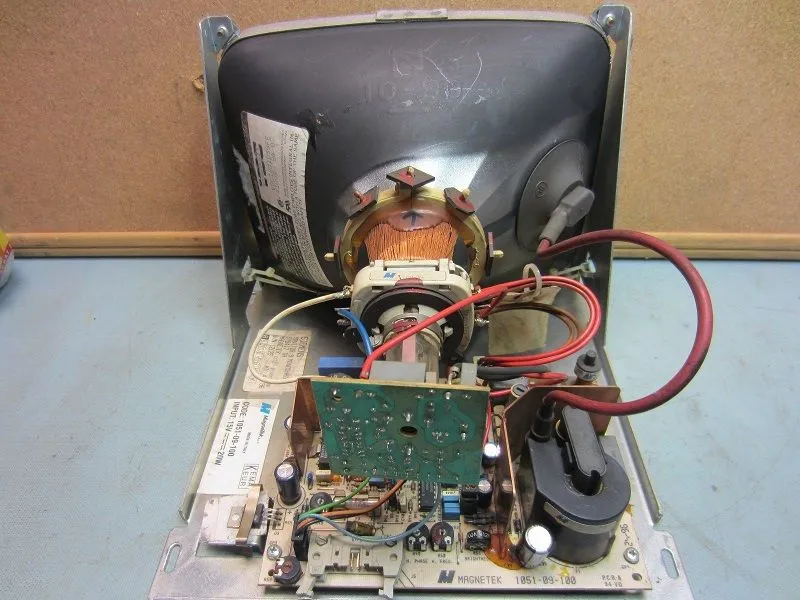
Siemens Sinumerik 810T和820T是欧洲机床中使用最广泛的CNC控制系统之一——应用于Deckel Maho、Hermle、DMG及众多德国制造的机床。这些控制系统使用9寸单色或彩色CRT显示器,目前已远超设计寿命。如果您的810T或820T显示器出现画面变暗、闪烁或黑屏,LCD升级是最经济有效的解决方案。
⚠ 重要提示: 与使用DC 24V的FANUC和三菱不同,Siemens Sinumerik CRT的电源随信号线输入。我们的LCD模块沿用同一路信号线供电,无需单独接入电源。订购前请确认您的系统型号。
兼容的Siemens型号
| Siemens控制系统 | CRT模块 | 屏幕 | 接口 | 供电 | LCD套件 |
|---|---|---|---|---|---|
| Sinumerik 810T (GA2/GA3) | 6FC3988-7FA20 | 9寸单色 | 双排16针 | 电源随信号线输入 | KTO-SI9M — |
| Sinumerik 820T (GA2/GA3) | 6FC3988-7FA20 | 9寸单色 | 双排16针 | 电源随信号线输入 | KTO-SI9M — |
| Sinumerik 810T GA3 | 6FC3988-7FA21 | 9寸单色 | 双排16针 | 电源随信号线输入 | KTO-SI9M — |
| Sinumerik 820T (后期) | SM0901-579417TA | 9寸单色 | 双排16针 | 电源随信号线输入 | KTO-SI9M — |
| Sinumerik 810D/840D | 6FC4600-0AR04 | 8.4寸彩色 | 专用 | 电源随信号线输入 | KTO-SI8C — |
识别您的Siemens CRT型号
要为您的机床找到正确的LCD替换方案:
- 查看CRT标签。在CRT面板或后壳上寻找贴纸。OEM零件号通常印为6FC3988-7FA20、6FC3988-7FA21、SM0901-579417TA或6FC4600-0AR04。
- 查看控制系统型号。Sinumerik控制类型显示在机床铭牌或控制面板上:810T(GA2或GA3)、820T、810D、840D。
- 拍照CRT标签并发送至[email protected]——我们将在24小时内确认兼容性。
CRT与LCD规格对比
| 规格 | 原装Siemens CRT(6FC3988) | Kongto LCD升级 |
|---|---|---|
| 显示类型 | 9寸单色CRT | 8.4寸工业TFT LCD |
| 分辨率 | 640×400(CRT) | 800×600(LCD)— 清晰2倍 |
| 亮度 | 100–150 cd/m²(衰减中) | 400 cd/m²(恒定) |
| 寿命 | 10,000–20,000小时 | 50,000+小时 |
| 功耗 | 60W | 15W |
| 接口 | 双排16针 | 双排16针 |
| 重量 | 约6 kg | 约1.2 kg |
| 在役CRT数量 | 50,000+台(估) | 直接替换 |
| 质保 | 无(已停产) | 2年 |
安装指南
在Siemens 810T或820T上安装LCD升级约需30分钟。无需特殊工具、无需更改CNC参数、无需改线。
所需工具
- 十字螺丝刀(#2)
- 一字螺丝刀(用于接线端子)
- 电压测试仪(安全检查)
分步操作
- 完全断电。使用主电源开关关闭Sinumerik控制。拔下AC电源线。等待3分钟让内部电容放电。用电压测试仪确认CRT电源输入端电压为零。
- 拆下CRT面板。CRT安装在由4颗螺丝固定的前面板后方。小心拆下面板。
- 断开线缆。从CRT背面拔下双排16针信号线。断开AC电源线(记录或拍摄接线位置——零线、火线、地线)。
- 拆除CRT。CRT单元通常由金属支架中的4颗安装螺丝固定。拆除最后一颗螺丝时托住CRT重量(约6 kg),然后将其取出。
- 安装LCD模块。将LCD模块放入同一支架。安装孔位与标准Siemens CRT安装孔位对齐——无需钻孔。用原螺丝固定。
- 连接线缆。连接双排16针信号线(防呆设计,只能单向插入)。连接AC电源线(火线、零线、地线)。LCD模块带有标准3针端子排——按标记接线。
- 测试。重新连接AC电源并开机。LCD应立即显示Sinumerik启动画面。如需调节亮度和对比度,可使用LCD上的OSD按键。
信号引脚定义 — Siemens 双排16针转LCD
Siemens 810T/820T通过双排16针接口输出标准RGB视频信号。我们的LCD模块可直接接收此信号——无需转换器或适配器。
| 双排16针引脚 | 信号 | 颜色 | 说明 |
|---|---|---|---|
| 1 | 地线 | 黑色 | 信号公共端 |
| 2 | 红色视频 | 红色 | 模拟RGB(0.7V p-p) |
| 3 | 绿色视频 | 绿色 | 模拟RGB(0.7V p-p) |
| 4 | 蓝色视频 | 蓝色 | 模拟RGB(0.7V p-p) |
| 5 | 水平同步 | 白色 | TTL电平 |
| 6 | 垂直同步 | 黄色 | TTL电平 |
| 7–25 | 地线/屏蔽 | — | 各类地线和NC引脚 |
常见问题与故障排查
安装后无显示
- 检查LCD模块输入端是否有AC电源(用电压测试仪)
- 检查双排16针连接——确保完全插紧并拧紧螺丝
- 确认CNC控制系统正在启动(听继电器吸合声,检查控制面板指示灯)
画面闪烁或滚动
- LCD会自动检测视频信号格式。如果出现滚动,控制系统可能输出非标准刷新率。请联系我们获取配置协助。
画面过暗或过亮
- 使用LCD OSD(屏幕显示)按键调节亮度和对比度。OSD通过LCD面板上的按键进入。
屏幕出现绿色矩形
- 这是Siemens 810T/820T已知的开机行为,控制系统在加载操作系统前会输出绿色背景。属正常现象,控制软件加载后即消失。
⚠ 安全提示: Siemens Sinumerik CRT含有高压组件(阳极电压10-15 kV)。请勿自行打开或维修CRT。放电时间:断电后至少3分钟。
维修vs替换 — 成本分析
| 方案 | 成本 | 停机时间 | 结果 |
|---|---|---|---|
| CRT维修(换显像管) | – | 3–10天 | 临时解决——CRT仍会再次故障(6–18个月) |
| 二手CRT(二手市场) | – | 不定 | 状态不明——可能立即故障 |
| Kongto LCD升级 | 30分钟 | 50,000+小时寿命,2年质保 |
810T和820T CRT已被Siemens停产超过15年。OEM替换件已不可得。二手商处的二手CRT本身已使用15–25年且正在老化。LCD升级是唯一实用的长期解决方案。
为什么Siemens 810T/820T LCD升级值得选择
- 价格: 相比400–600美元却只能维持6–18个月的CRT维修
- 安装: 30分钟,即插即用,无需更改Siemens参数
- 画质: 800×600 LCD对比640×400 CRT——文字显著更清晰易读
- 安全: 无高压(15W对比60W,无致命阳极电压)
- 质保: 2年质保,对比CRT维修零质保
- 现货: 深圳现货,48小时内发货,
获取报价
如需确认与您的Siemens Sinumerik型号的兼容性,请将CRT标签照片发送至[email protected]。我们将在24小时内回复。
可用型号:
- KTO-SI9M — 用于6FC3988-7FA20/7FA21、SM0901的9寸单色替换 —
- KTO-SI8C — 用于6FC4600-0AR04的8.4寸彩色替换 —
邮箱: [email protected] | 电话: +86-13686889647